Wednesday, 16 October 2019

iOS 13 Is Now Running on 50% of All iPhones out There

Apple has updated its App Store Developers page to reflect that iOS 13 is now installed on 55% of devices introduced in the last year and 50% of all iPhones out there. As for iPadOS, it is running on 41% of iPads launched in the last four years, with overall 33% iPads out there running the OS.
Apple has also broken the user base of iOS 13 and iPadOS 13 into two, though this makes sense since they are now two completely different OSes and were launched at different times of the year. This also explains as to why the adoption rate of iPadOS 13 is lower than iOS 13.
The iOS 13 adoption rate puts it roughly on par with iOS 12 which was also running on around 55% of iOS devices around the same time last year. Apple released iOS 13 on September 19th and has since then rolled out multiple updates to fix a bunch of bugs and stability issues.Also Read:Online Music Stores to buy MP3
Apple has calculated the numbers by calculating the number of devices running iOS 13 or iPadOS that visited the App Store on October 15, 2019. The adoption rate ofiOS 13 and iPadOS 13 will likely jump even higher once Apple releases iOS 13.2 towards the end of this month. iOS 13 has been a relatively buggy release and Apple has been continuously rolling out updates to fix the issues. This might have deterred a lot of users from not upgrading to it.Also Read:HEVC/H.265 Converter


Monday, 4 March 2019

How to Airdrop from iPhone to iPhone?


Gone are the days when iOS users had to use a third-party service like Dropbox to transfer a file from one device to another successfully. With AirDrop, users are guaranteed a quicker, easier way to share their files on any iOS devices such as iPhone, iPad, and Mac.

Today we will be focusing on the iPhone as it is the most commonly used iOS device among the three. The methods which will be discussed work for iOS 12, also.


How to AirDrop Files from iPhone to iPhone: Step by Step Process


Problem Locating Another iPhone When You AirDrop


What Can You AirDrop from iPhone to iPhone?


How to Transfer Files That AirDrop Doesn't Support from iPhone to iPhone?
1. How to AirDrop Files from iPhone to iPhone?

Follow these simple steps below and get started.


Step 1: Switch on Wi-Fi and Bluetooth on both iPhone devices. There is no need to connect to a network.


Step 2: Swipe up from the bottom of your iPhone screen to open the 'Control Center'.


Step 3: Click on 'AirDrop.' Then you can choose either 'Contacts Only' or 'Everyone' to send or receive data from you.


Step 4: Choose the file(s) you wish to transfer. For instance, go to the Contacts App and select the contact that you want to share on another iPhone device.


Step 5: Tap on the Share button and select the iPhone with which you are sharing your files. It should be visible on your screen.


Step 6: From the receiver's iPhone, they choose 'Accept' to access the files sent from your device.


2. Problem Locating Another iPhone When You AirDrop?

There will be instances where you are not able to share files because you cannot see the other person's iPhone while using AirDrop.

Don't panic; these concerns may be solved with some simple troubleshooting.


Maybe it is just distance that is the problem. If you are not near enough to your sender or receiver, you may not be able to transfer files successfully. Bluetooth and Wi-Fi can only reach a specific range, so if you're far away, you will lose your connection.


Check if the person you're sharing with has AirDrop receiving settings that are set to 'Contacts Only'. If you are in their Contacts list, you must provide your Apple ID information in your contact card before continuing with the process. Otherwise, have them set their AirDrop receiving setting to 'Everyone' to bypass this problem.


3. What Can You AirDrop from iPhone to iPhone?

With AirDrop, there is an extensive list of files you can send to your family, friends, and acquaintances.

Most users usually send photos and videos, but the list is not limited to those. As long as you both have an iPhone, then feel free to share almost everything under the sun. Files include the following:


Photos


Videos


Contacts


Passbook passes


Notes


Documents and PDFs


Mail attachments


Items stored in Files app


Voice Memos


Web URLs


Links to App pages (App Store)


Maps directions

AirDrop does have its restrictions – it doesn't support messages and popular 3rd-party social apps such as iMessage or WhatsApp from iPhone to iPhone.

There are two solutions.

If the sender's privacy is not of high concern and you want to share all the content, then you can forward your message and send it directly to your recipient via text or any third-party direct messaging app.

Using AirDrop, you can create a file from 'Notes' or 'Documents,' then type the message out there and share it immediately.

Not ideal is it? However, there is a much more straightforward and user-friendly way to achieve this through a third party app.
4. Transfer Files AirDrop Doesn't Support to Another iPhone

If every single piece of data on your phone is essential to you, and you need a backup of ALL your files, we recommend iMyFone iTransor iOS Data Backup & Restore Tool! It is easy to use with breakthrough features that will ensure your files' safety.


Also Read:jihosoft Free iPhone Data Recovery

Sponsor ads:

Gihosoft Free iPhone Data Recovery:https://www.gihosoft.com/iphone-data-recovery-free.html

Gihosoft iPhone Data Recovery Free

Free iPhone Data Recovery Software for Windows/Mac

Recover up to 12+ types of files, including contacts, SMS, photos, WhatsApp, Viber, notes, etc.

Restore lost data from iOS devices directly or from iTunes and iCloud backup

Recover iPhone data lost due to iOS upgrade/jailbreak, accidental deletion, device lost or broken

Support all the latest iPhone, iPad and iPod Touch

Both Free and Pro version.

If you lost data after you updated to a new iPhone, you can always use Gihosoft iPhone Data Recovery to get the data back from the old iPhone or backup.You may also like: iphonerecovery.com

If you use android phones, please choose Gihosoft Android Data Recovery.

With Gihosoft Android Data Recovery, no longer afraid of data loss!

Must read:Youtube video downloader for pc

Gihosoft RePicvid Free Photo Recovery Software provides a free photo recovery software for windows to help users recover the deleted or lost photo for free.Jihosoft Android Data Recovery: the best Android Data Recovery software for Windows and Mac to recover deleted contacts, messages, photos, videos, WhatsApp and etc from Android devices.Tips:How to transfer messages from iPhone to iPhone

Thursday, 14 February 2019

How to Clear Instagram Cache on iPhone


Part 1. Check How Much Space Instaram Is Using

It’s very simple to see how much space your Instagram is taking up on your device.

Step 1. Open the Settings app.

Step 2. Go to General > Usage (wait until all the sizes of the apps load)

Step 3. The total storage used by Instagram will be listed.


Must Read:If you lost data after you updated to a new iPhone, you can always use Gihosoft iPhone Data Recovery to get the data back from the old iPhone or backup.

Gihosoft Free iPhone Data Recovery:iphonerecovery.com


If you use android phones, please choose Gihosoft Android Data Recovery

Thursday, 3 January 2019

How to go back to Substitute from Cydia Substrate v0.9.700


WHY YOU SHOULD SWITCH FROM SUBSTRATE TO SUBSTITUTE

According to Saurik, Cydia Substrate v0.9.700 is the most stable build of Substrate till date. In spite of that, the latest build is not fully stable on devices having an A7 or A8 processor.

Users who own older models have complained about frequent freezes, respring loops, and reboots after switching to the latest build of Substrate.

Several users who own an iPhone X, a device that’s supposed to be fully compatible with the latest update, have experienced similar glitches as well.

View image on Twitter


Yalu Jailbreak@Yalujb

Saurik has pushed Cydia Substrate v0.9.700 update - the most well-tested update that supports iOS 3.0-11.3.1 (unc0ver). You can download it from Saurik's beta repo - http://apt.saurik.com/beta/substrate11/ …. #RETWEET

Thankfully, the developer team of unc0ver jailbreak is aware of the issue and is diligently working on a patch.Gihosoft Free iPhone Data Recovery:https://www.gihosoft.com/iphone-data-recovery-free.html

Gihosoft iPhone Data Recovery Free

You can now either wait for Saurik to push a fix or you can switch to the good old Substitute for the time being.
HOW TO GO BACK TO SUBSTITUTE FROM CYDIA SUBSTRATE
METHOD 1 (RECOMMENDED)

This method involves putting your device in no-Substrate jailbreak mode. Disabling Substrate will automatically enable Substitute.


Press and hold the “volume up” button.


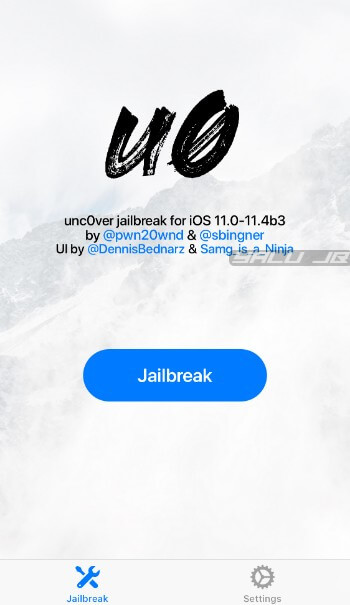
Open the unc0ver jailbreak application from your home screen.


Tap Jailbreak to put your device in the jailbroken state. Remember, you must keep the “volume up” button pressed at all times.


Substitute will now get enabled.
METHOD 2

If the aforementioned method doesn’t work for you, you can try the second method given below. It involves a few more steps but the end result is the same.


Restart your Apple device to put it in jailbreak mode.


Run unc0ver jailbreak app with the Load Tweaks option toggled off.


Open Cydia and downgrade Cydia Substrate to an older version.


Install the Substitute package. Doing so should automatically uninstall Substrate. However, if Cydia Substrate is still present, you must delete it manually.


Restart your device and put it in the jailbroken state again.

That’s all there’s to it. If, however, you continue experiencing issues with Substitute, try installing the ByeVSD Cydia tweak.

It will fix the pesky videosubscriptiond daemon that triggers random freezes and reboots.

Sponsor ads:

Jihosoft iPhone Data Recovery:https://www.jihosoft.com/recovery/ios-data-recovery.html

Jihosoft iPhone Data Recovery

Free iPhone Data Recovery Software for Windows/Mac

Recover up to 12+ types of files, including contacts, SMS, photos, WhatsApp, Viber, notes, etc.

Restore lost data from iOS devices directly or from iTunes and iCloud backup

Recover iPhone data lost due to iOS upgrade/jailbreak, accidental deletion, device lost or broken

Support all the latest iPhone, iPad and iPod Touch.

Tips:

How to transfer messages from iPhone to iPhone

Gihosoft Free iPhone Data Recovery:https://www.gihosoft.com/iphone-data-recovery-free.html

Gihosoft iPhone Data Recovery Free

Wednesday, 15 August 2018

Top 36 NEW Electra Jailbreak Tweaks Perfect for iOS 11-11.3.1-11.4 Beta

Here are some top 36 Cydia Tweaks compatible with iOS 11, 11.3.1-11.4 beta Electra jailbreak.

Image result for 36 Cydia Tweaks
iPhone is nothing without the jailbreak tweaks. Cydia always allows you to customize your iPhone or iPad the way you like. There are a huge number of Cydia tweaks, themes, add-ons, widgets, system applications that change your iOS devices look, appearance, and the more functionality that Apple does not give you in the iOS version.


If you have jailbroken your device and waiting for the best Cydia tweaks then here we cover up some top 25 Cydia Tweaks that are compatible with the Electra jailbreak on iOS 11-11.3.1-11.4 beta.


And if you are on jailbreakable iOS version like iOS 11, 11.3.1 or iOS 11.4 beta and had not yet jailbroken then here’s a guide to jailbreak your iPhone or iPad.


How to Jailbreak iOS 11 – iOS 11.4


To get the below best Cydia tweaks for iOS 11-11.4 you need to add the Cydia Sources which you can find in the table.


Adding Cydia Sources is simply, just open Cydia, then tap “Sources” > Tap “Edit” and “Add”. After adding the sources you can install the Cydia tweaks that are supports iOS 11, 11.3.1-11.4 beta.


Cydia Sources for iOS 11.3.1-11.4


http://apt.thebigboss.org


http://cydiageek.yourepo.com


http://julioverne.github.io


https://repo.d4ni.nl/


https://shade-zepheri.github.io


https://repo.midkin.net


http://subdiox.com/cydia/


Top Cydia Tweaks for iOS 11-11.3.1-11.4 beta Jailbreak


Tweak

Description

Price

Repo


3Edgy5Me

Customizable S8 Style Notifications on iOS 11 or lower

Free

BigBoss


AutoWall

Set wallpaper at a specific time

Free

Julioverne


BatteryNotch

Represent the battery percentage around the notch using a thin colored line.

$1.50

BigBoss


BatteryPercentX

Replaces the battery icon with percentage on the iPhone X

Free

Hackyouriphone


Better Settings

Make your settings app your own, set a background image or color, make bubbles, remove icons and more

Free

Packix


BetterCCXI

Enhanced Control Centre

$0.99

Packix


BioProtect X

Protect your apps with Face ID or passcode on iPhone X.

$2.99

BigBoss


Boxy

Fully customize your icon layout

$1.99

Packix


Call Bar X

Minimalistic in-call screen both for incoming and outgoing that donot interrupt when using any apps.

$3.99

BigBoss


ChromaHomeBarX

Customize the HomeBar with color and animation styles

Free

BigBoss


Classic Dock for iPhone X

Turns the iPhone X’s dock into the iPhone 6/7/8 style.

Free

BigBoss


Compatimark

Highlights compatible packages in Cydia with blue or golgen shield icon.

Free

Packix


EasySwitcherX

Swipe up on apps in the switcher to kill them just like iOS 11

Free

Hackyouriphone


FastUnlockX

Facilitates unlocking your iPhone X automatically.

Free

BigBoss


FleetingSwicher11

Gives the oppurtunity to get useful and visual options for the iOS 11 App Switcher.

Free

BigBoss


FloatyDock

Brings the iPad dock to all devices.

Free

BigBoss


FreeRamUnderTimeX

Display the free RAM under the status bar on iPhone X

Free

BigBoss


HomeBarSizer

Customize the size of the HomeBar on iPhone X.

Free

BigBoss


LockAmin

Custom lock animation

Free

Hackyouriphone


Malipo

Take control over your charge sound.

Free

Packix


ModernXI

Modern notification look

Free

Packix


NoctisXI

Dark mode on whole iOS system.

$1.99

Packix


NoMoreSmallApps

Make all apps full screen on iPhone X even it is incompatible.

Free

Hackyouriphone


Notchification

Receive beautiful animations with your notification.

$2.00

BigBoss


Nougat

Android notification drawer for iOS.

Free

Hackyouriphone


Palette

Colorize your notifications according to the app icon.

Free

Packix


PhotoLockDown

Lock Photos when sharing with others.

$1.00

Packix


Power Tap 2

Power down options

Free

Subdiox


Respring App

Adds respring icon to home screen

Free

Cydiageek


SBCard

Adds home screen card to switcher, swipe up to close all apps.

Free
Jihosoft Giveaway Alert:
iPhone Backup Extractor - Extract Data from iPhone Backup
The best iPhone Backup Extractor software to extract photos, text messages, contacts, voice memos, note, WhatsApp, Viber and etc from iPhone/iPad backup.
Hackyouriphone


Small Siri

Reduces the size of the Siri at the top of your screen rather than covering entire screen.
Tips:
Must read:Gihosoft Free iPhone Data Recovery:https://www.gihosoft.com/iphone-data-recovery-free.html
Free

Packix


SpinXI

Custom music widget both on lockscreen and homescreen.

$0.99

Packix


SquareCode

Change the corner radius of the passcode button.

Free

BigBoss


Stylish 11

Customize system settings in a stylish way.

Free

BigBoss


Swipe2Hide

Swipe away the dock and status bar

Free

Packix


XenHTML

Allows you to add the lockscreen and homescreen widgets.

Free

Xenpublic

Must Read:Jihosoft iTunes Backup Unlocker
Jihosoft Android Data Recovery: the best Android Data Recovery software for Windows and Mac to recover deleted contacts, messages, photos, videos, WhatsApp and etc from Android devices.

Google tracks you even if you disable your iPhone’s location history


Google tracks you even if you disable your iPhone’s location history
GOOGLE IS WATCHING YOU – EVEN IF YOU SAY NO

As suspected, Google has unfettered access to all location data stored on your iPhone.

According to an Associated Press report, Google apps and services for Apple devices store your location data even if you disable location tracking from privacy settings.

It is useless to deactivate the GPS of the mobile or manage Google’s permissions because Google knows where you are even if you do not want it to.

This is made possible due to the location history of any of Google’s apps for iOS. If you disable your device’s GPS, Google will stop storing location markers but it will still know where you are in real time.


This is not the first time that Google has been embroiled in privacy battles. Back in 2017, the search giant admitted that it collects location data of Android users, even when the Android location services were disabled.
WHAT GOOGLE HAS TO SAY ABOUT LOCATION TRACKING

Google states that users can disable their location history whenever they want to but this couldn’t be further from the truth. The company defends itself by stating that location does not only depend on GPS but also on location history, web, and app activity.

You can use myactivity.google.com to deactivate apps and services that Google uses to track you. However, activity control is limited only to Google apps.

Jihosoft Giveaway Alert:

iPhone Backup Extractor - Extract Data from iPhone Backup
The best iPhone Backup Extractor software to extract photos, text messages, contacts, voice memos, note, WhatsApp, Viber and etc from iPhone/iPad backup.
Must Read:Jihosoft iTunes Backup Unlocker
Jihosoft Android Data Recovery: the best Android Data Recovery software for Windows and Mac to recover deleted contacts, messages, photos, videos, WhatsApp and etc from Android devices.

Tuesday, 14 August 2018

Tips securely wipe the data off hard drives, SSDs, flash drives, iPhones and iPads, and Android devices


Tips securely wipe the data off hard drives, SSDs, flash drives, iPhones and iPads, and Android devices


We live in an age where a little bit of paranoia is healthy and making sure that out personal information is safely and securely erased off devices we've used is a good thing. Here's a quick guide to securely wiping hard drives (HDDs), solid state drives (SSDs), flash drives, and even iOS and Android devices.


Built-in way to erase iOS and Android devices


iOS and Android devices both have built-in tools to erase the devices.


On iOS: Settings > General > Reset and then tap Erase All Content and Settings.


On Android: Settings > Backup & reset > Factory data reset and then tap Reset phone or Reset device.


You can also securely wipe the devices remotely using Find My iPhone for iOS or the Google Account associated with the Android device.


Price: Free Gihosoft Free Android Data Recovery can help you easily recover lost data such as photos, videos, contacts, text messages, WhatsApp & Viber chats from Google Pixel/XL or other Android phones effortlessly.Jihosoft Giveaway Alert:


iPhone Backup Extractor - Extract Data from iPhone Backup


The best iPhone Backup Extractor software to extract photos, text messages, contacts, voice memos, note, WhatsApp, Viber and etc from iPhone/iPad backup.

iOS 13 Is Now Running on 50% of All iPhones out There

Apple has updated its App Store Developers page to reflect that iOS 13 is now installed on 55% of devices introduced in the last year an...