WHY YOU SHOULD SWITCH FROM SUBSTRATE TO SUBSTITUTE
According to Saurik, Cydia Substrate v0.9.700 is the most stable build of Substrate till date. In spite of that, the latest build is not fully stable on devices having an A7 or A8 processor.
Users who own older models have complained about frequent freezes, respring loops, and reboots after switching to the latest build of Substrate.
Several users who own an iPhone X, a device that’s supposed to be fully compatible with the latest update, have experienced similar glitches as well.
View image on Twitter


Yalu Jailbreak@Yalujb
Saurik has pushed Cydia Substrate v0.9.700 update - the most well-tested update that supports iOS 3.0-11.3.1 (unc0ver). You can download it from Saurik's beta repo - http://apt.saurik.com/beta/substrate11/ …. #RETWEET
Thankfully, the developer team of unc0ver jailbreak is aware of the issue and is diligently working on a patch.Gihosoft Free iPhone Data Recovery:https://www.gihosoft.com/iphone-data-recovery-free.html
Gihosoft iPhone Data Recovery Free
You can now either wait for Saurik to push a fix or you can switch to the good old Substitute for the time being.
HOW TO GO BACK TO SUBSTITUTE FROM CYDIA SUBSTRATE
METHOD 1 (RECOMMENDED)
This method involves putting your device in no-Substrate jailbreak mode. Disabling Substrate will automatically enable Substitute.
Press and hold the “volume up” button.
Open the unc0ver jailbreak application from your home screen.
Tap Jailbreak to put your device in the jailbroken state. Remember, you must keep the “volume up” button pressed at all times.
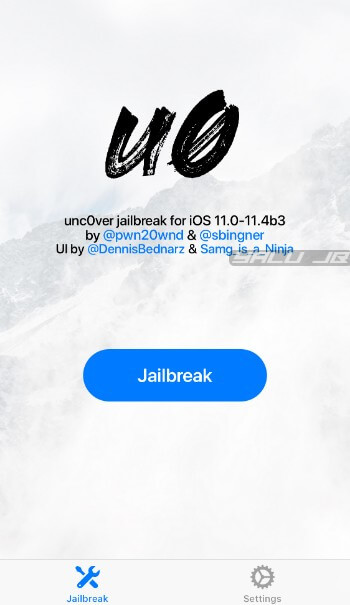
Substitute will now get enabled.
METHOD 2
If the aforementioned method doesn’t work for you, you can try the second method given below. It involves a few more steps but the end result is the same.
Restart your Apple device to put it in jailbreak mode.
Run unc0ver jailbreak app with the Load Tweaks option toggled off.
Open Cydia and downgrade Cydia Substrate to an older version.
Install the Substitute package. Doing so should automatically uninstall Substrate. However, if Cydia Substrate is still present, you must delete it manually.
Restart your device and put it in the jailbroken state again.
That’s all there’s to it. If, however, you continue experiencing issues with Substitute, try installing the ByeVSD Cydia tweak.
It will fix the pesky videosubscriptiond daemon that triggers random freezes and reboots.
Sponsor ads:
Jihosoft iPhone Data Recovery:https://www.jihosoft.com/recovery/ios-data-recovery.html
Jihosoft iPhone Data Recovery
Free iPhone Data Recovery Software for Windows/Mac
Recover up to 12+ types of files, including contacts, SMS, photos, WhatsApp, Viber, notes, etc.
Restore lost data from iOS devices directly or from iTunes and iCloud backup
Recover iPhone data lost due to iOS upgrade/jailbreak, accidental deletion, device lost or broken
Support all the latest iPhone, iPad and iPod Touch.
Tips:
How to transfer messages from iPhone to iPhone
Gihosoft Free iPhone Data Recovery:https://www.gihosoft.com/iphone-data-recovery-free.html
Gihosoft iPhone Data Recovery Free


No comments:
Post a Comment